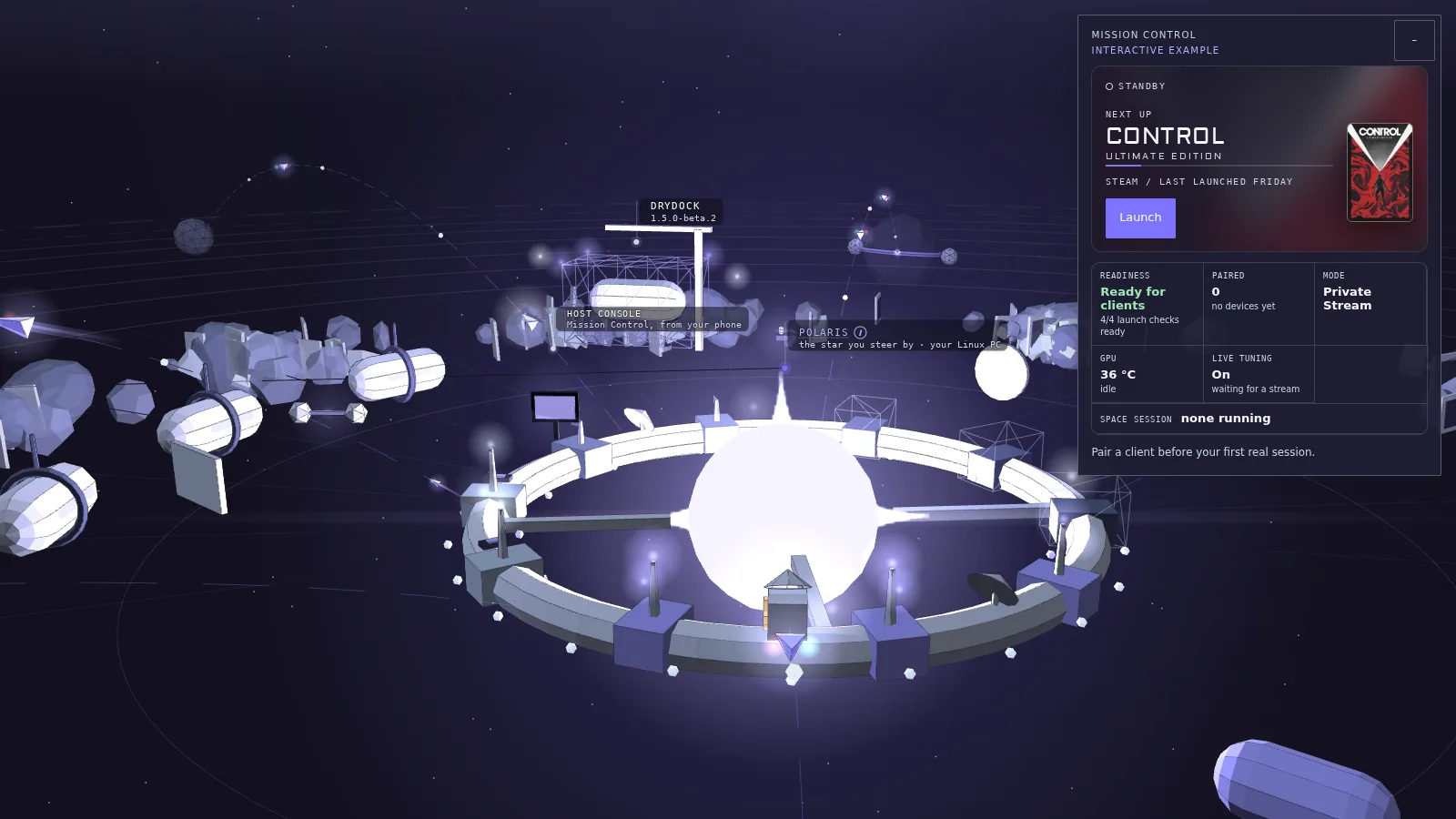
Launch the example game and watch its destination light up.
Standby
Next up
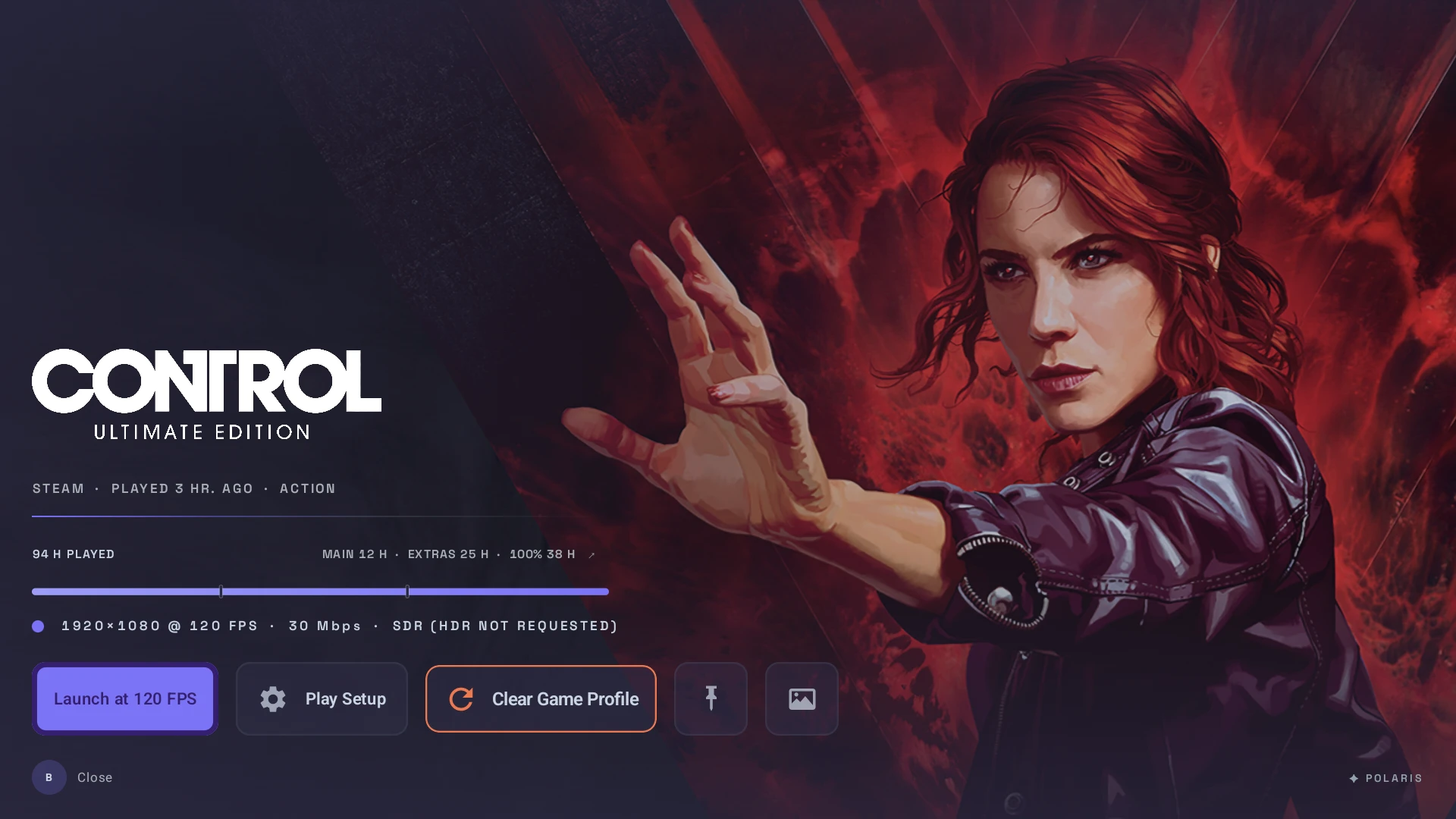
ControlUltimate Edition
Steam /last launched today
Readiness
Ready for clients
4/4 launch checks ready
Paired
0
no devices yet
Mode
Private Stream
GPU
--
idle
Live Tuning
On
waiting for a stream
Space session
none running
0 paired clients ready to connect
Console Details
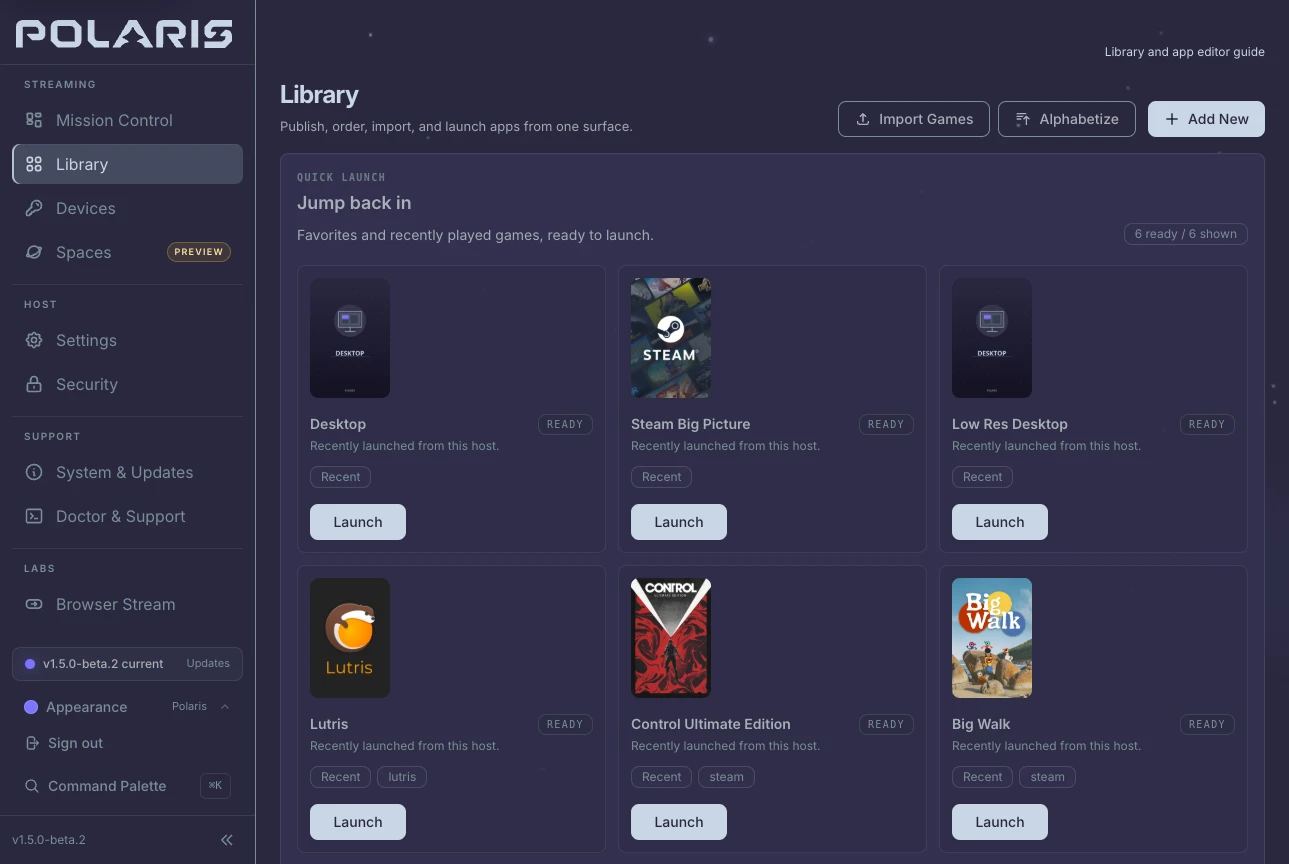
Recent Games · Illustration3 example games
Control Ultimate Edition
Big Walk
Desktop
Diagnostics
Frame health
--not sent · no stream yet
Pacing
--not sent · no stream yet
Host vitals
--not sent · no stream yet
Launch checks
--not sent · no stream yet
Session history
--not sent · no stream yet
From Nova on Android, Host Console opens this console in Nova's theme, and Launch streams the game to that device in 1.5.0-beta.2.
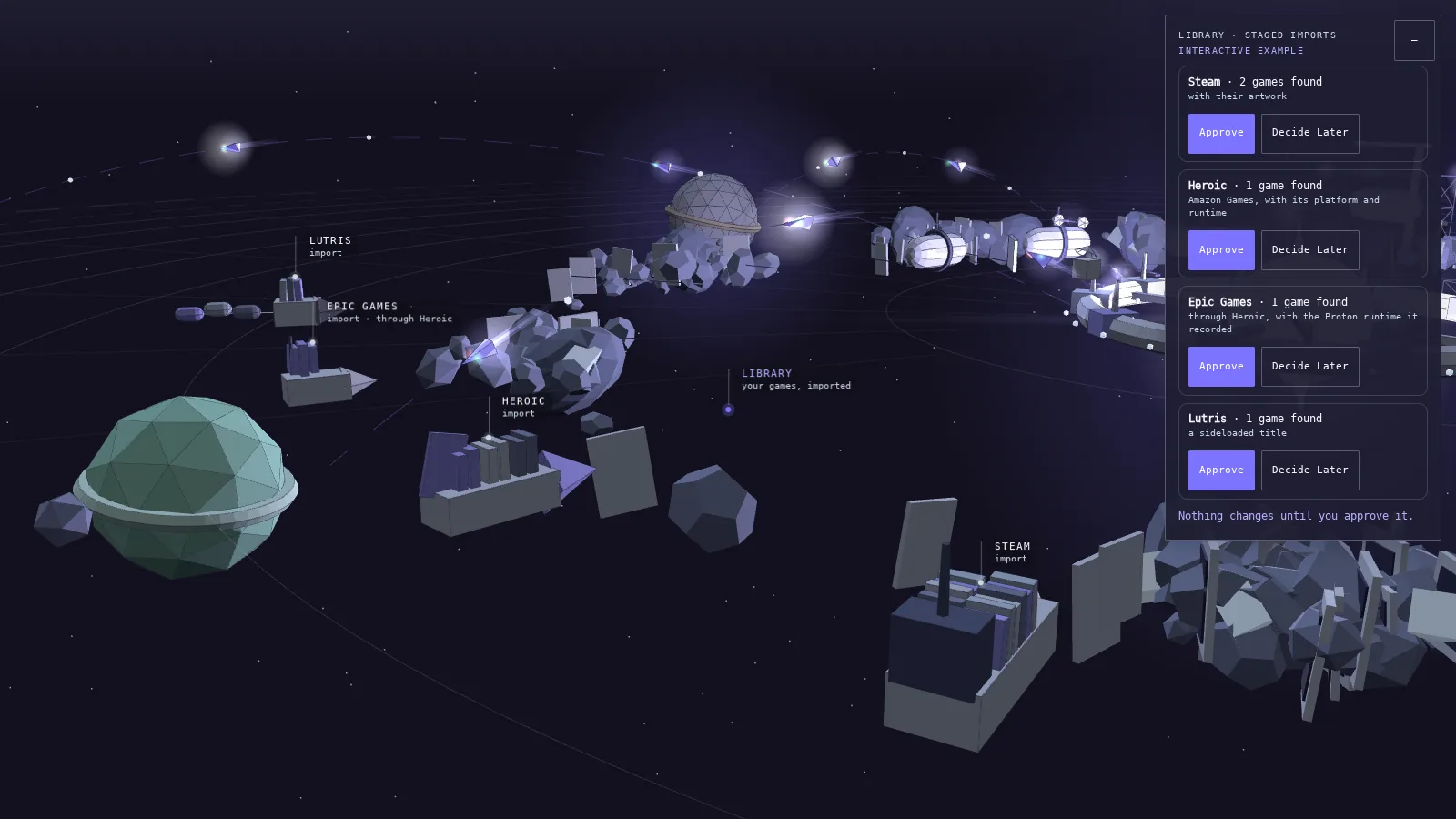
Library · Staged Importsinteractive example
Approve one import and watch its freighter join the belt.
Steam · 2 games foundwith their artwork
Added to the librarySet Aside for Later
Heroic · 1 game foundAmazon Games, with its platform and runtime
Added to the librarySet Aside for Later
Epic Games · 1 game foundthrough Heroic, with the Proton runtime it recorded
Added to the librarySet Aside for Later
Lutris · 1 game founda sideloaded title
Added to the librarySet Aside for Later
Nothing changes until you approve it.
Artwork & Covers
Find Covers · 3 games with no cover · 3 matches proposedNothing is stored until you apply it from the review.
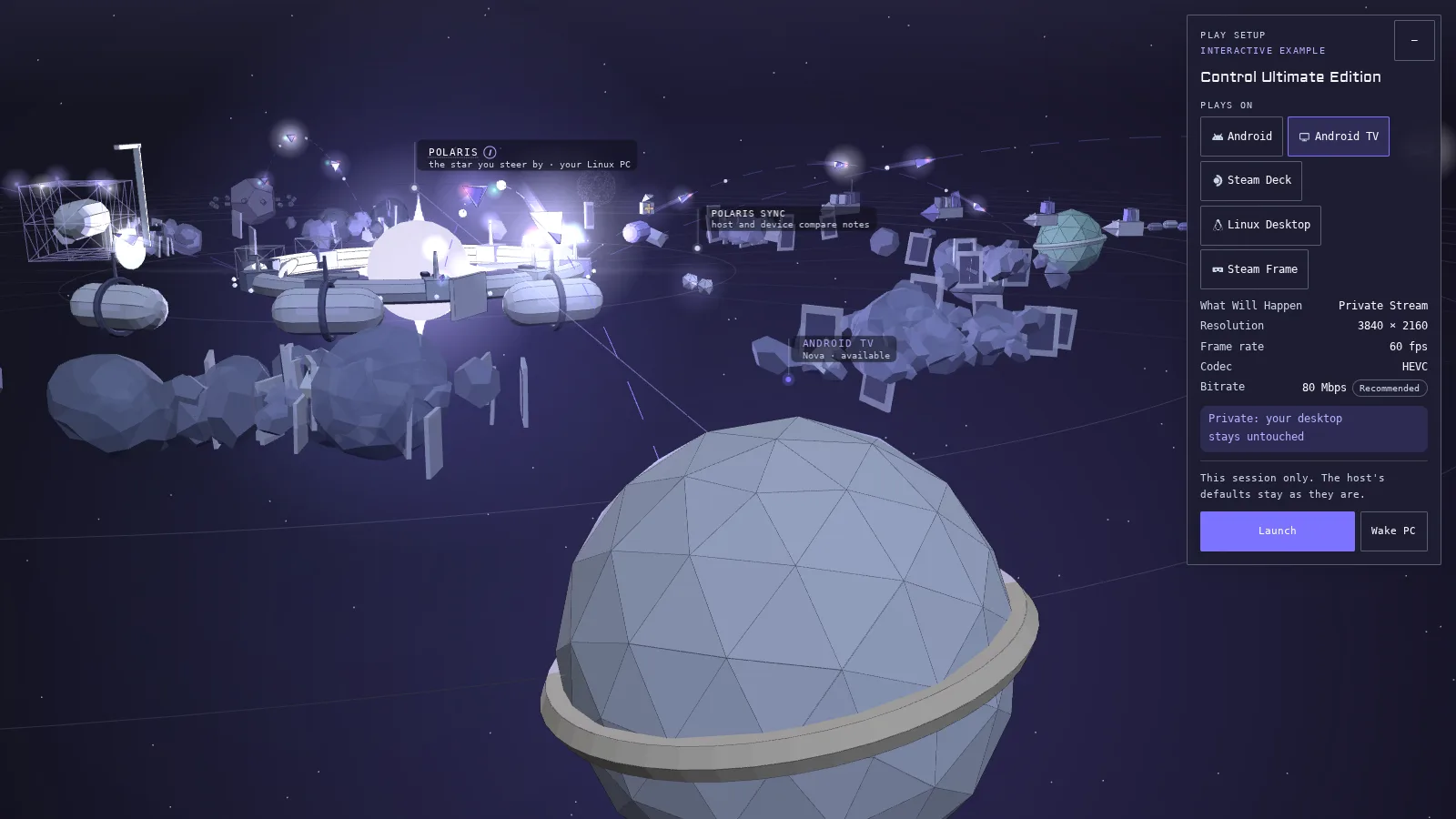
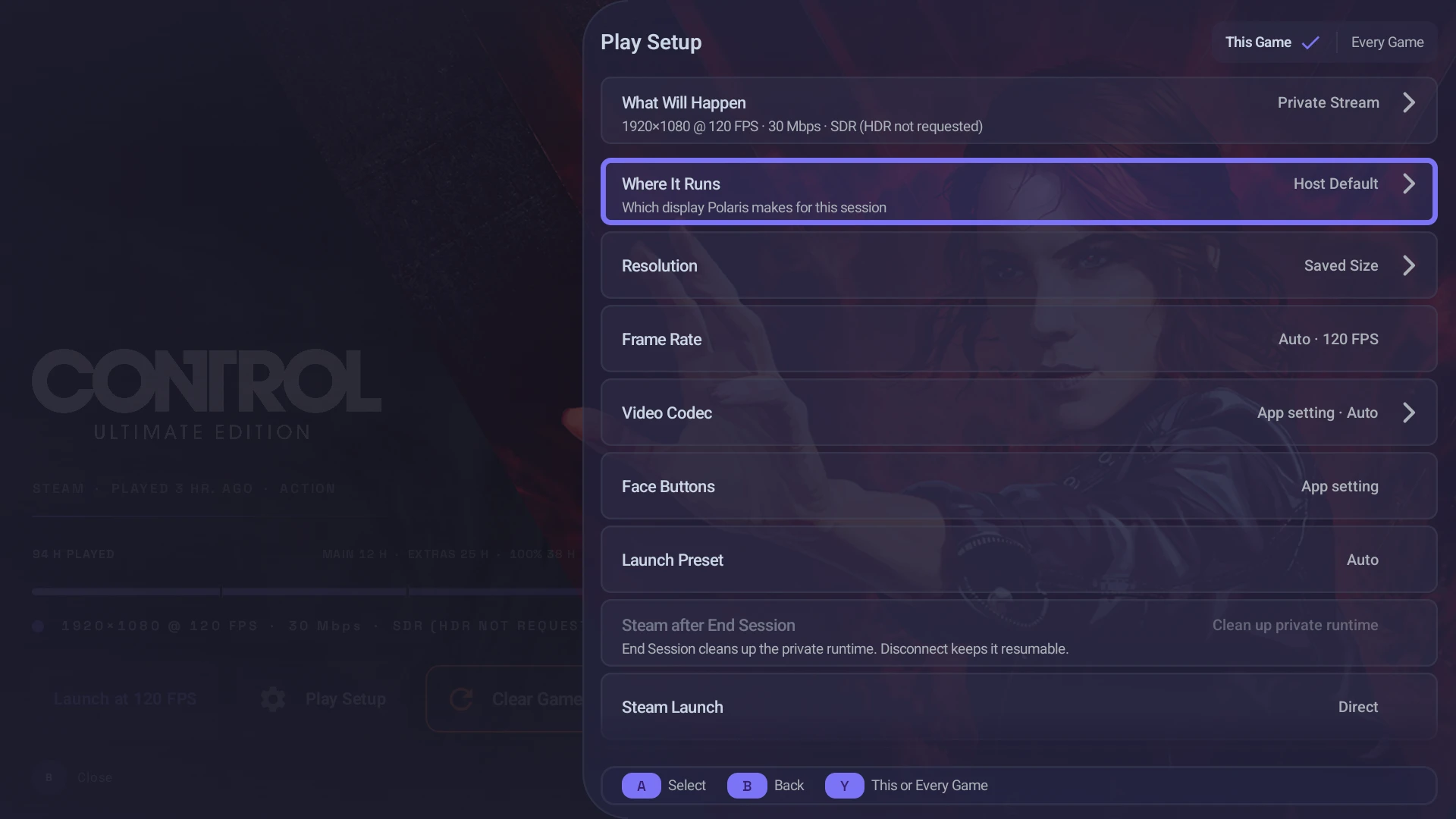
Play Setupinteractive example
Pick a screen, check its plan, then Launch.
Control Ultimate Edition
What Will Happen
Private Stream
Resolution
3840 × 2160
Frame rate
60 fps
Codec
HEVC
Bitrate
80 MbpsRecommended
Private: your desktop stays untouched
Streaming now
This session only. The host's defaults stay as they are.
More Settings
Auto never picks PyroWave; choose it by name.
Decode
hardware decoder
Polaris Sync · Every GameSynced
Stream Display
Private Stream
Launch Profile
80 Mbps · Host keeps 80 Mbps · matched
A normal launch never rewrites the host default; a per-game choice in Play Setup wins for that game. A host mode change applies after the next launch.
On Android, per-host rules can pick a saved Settings Profile for a launch and name the rule that matched.
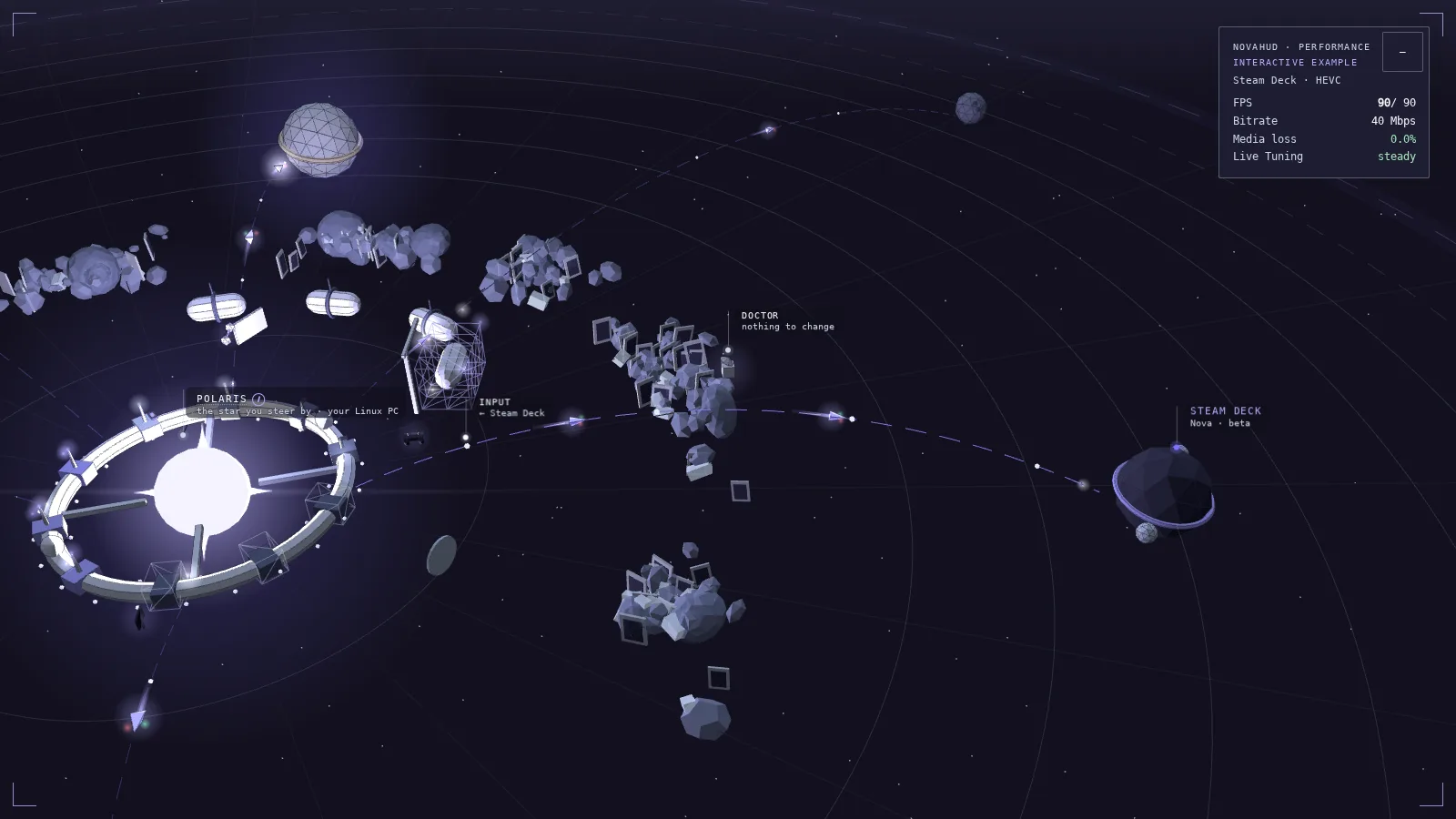
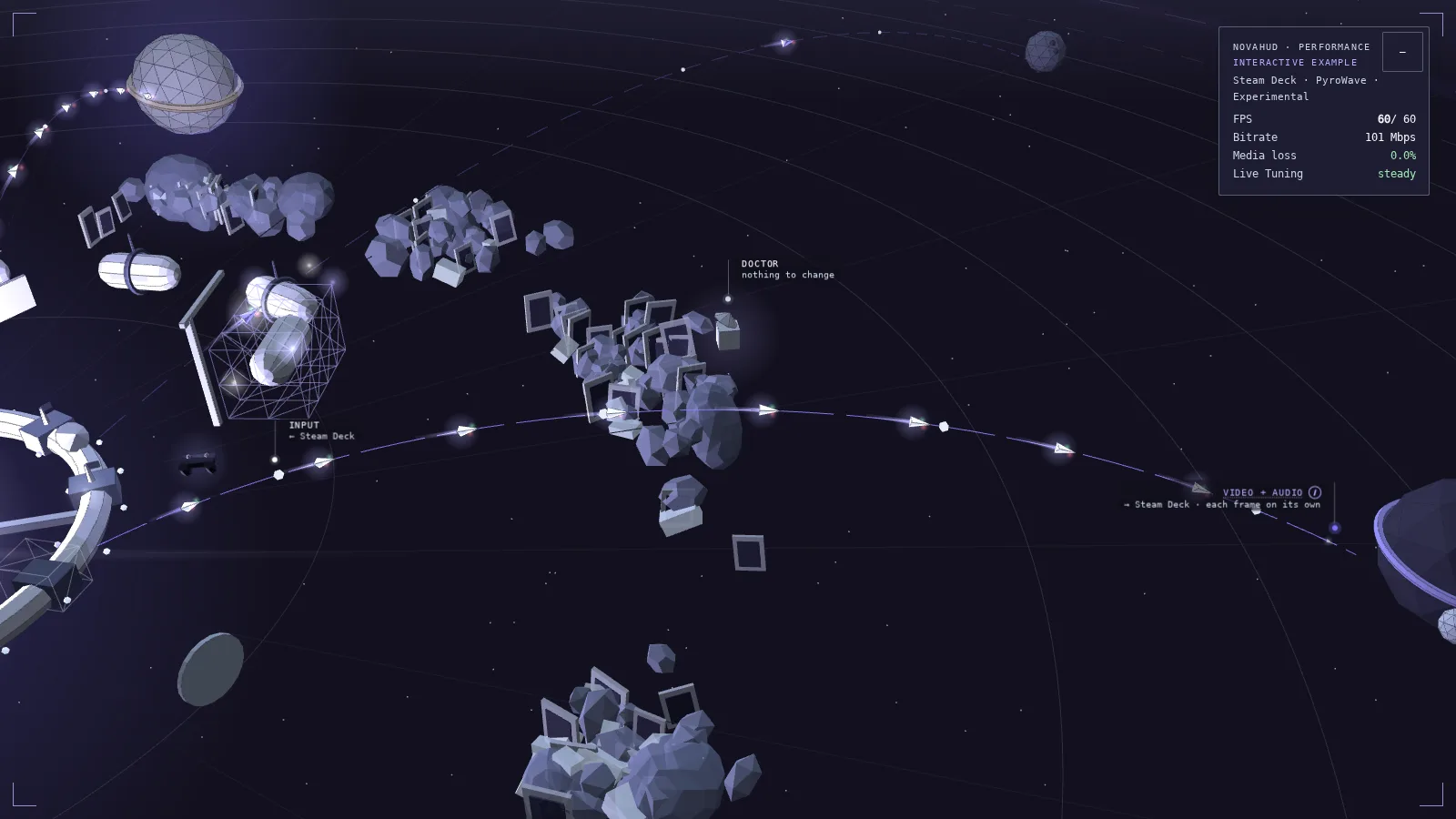
NovaHUD · Performanceinteractive example
Simulate congestion and watch the bitrate step down, then recover.Drop a packet on each codec and see which stream stalls.
Steam Deck · HEVC
FPS
90/ 90
Bitrate
40 Mbps
Media loss
0.0%
Live Tuning
steady
More Readings
Latency
9 ms
Stream
1280 × 800 · HEVC
Low 1%
--
Mode
Private Stream
Decode
hardware decoder
Four rates
Game
--
Encode
--
Stream
90 fps
Display
90 fps
Game, encode, stream and display rates are measured in different places. A stream cannot add frames the game did not render.
Watch Live Tuning lower the bitrate, then bring it back once the lane is clean.
Guide + Y cycles the layouts
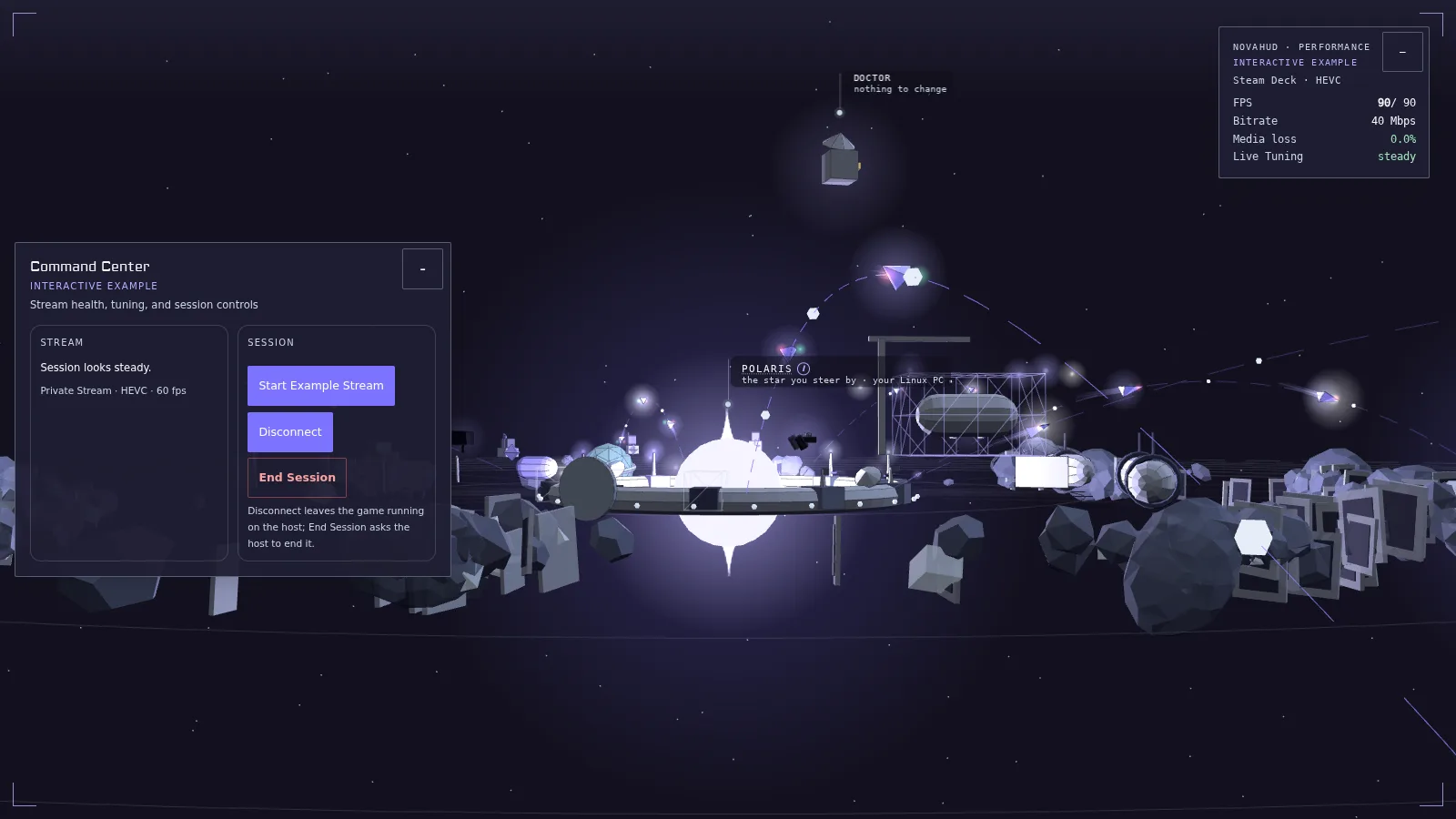
Command Centerinteractive example
Disconnect, then Resume without ending the game.
Stream health, tuning, and session controls
Stream
Session looks steady.
Private Stream · HEVC · 90 fps
Session
Disconnect leaves the game running on the host; End Session asks the host to end it.
Tuning & Tools
Live Tuning
On, it steps the bitrate down under congestion and climbs back; off, the bitrate holds and loss shows it.
Overlays
HUD Mode: Performance · Guide + Y cycles the layouts
Steam
On the paired PC, from the couch in 1.5.0-beta.2. Quit asks again while a game is running.
Report This Moment
Freezes the current client readings into a local report. Nothing is sent on its own.
Guide + Start opens it over the game
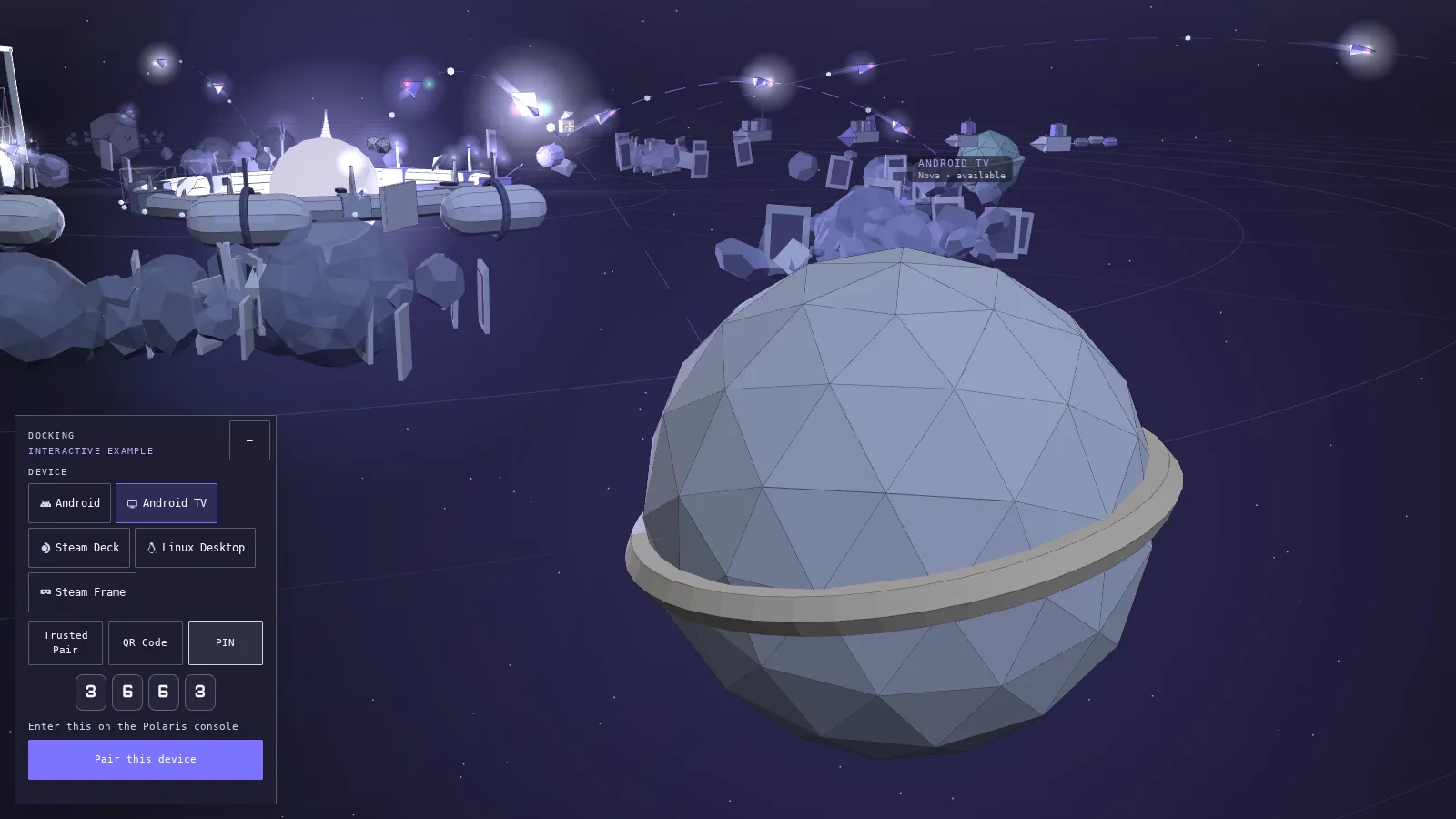
Dockinginteractive example
Pair a device and watch Mission Control count it.
On a network you trust, the console lets a device pair without a PIN.
An example code. Scan it with your phone, if you dare.
Scan the code the Polaris console shows, and you're paired.
4071
Enter this on the Polaris console
Session & Pairing Details
Disconnect
the game keeps running for later
Resume
pick up the session you left
End
stops only the game that session started
Watch
joins a stream without taking it over
On Android, the host's Library can show how the last stream went in 1.5.0-beta.2: duration, samples measured, averages and why it ended.
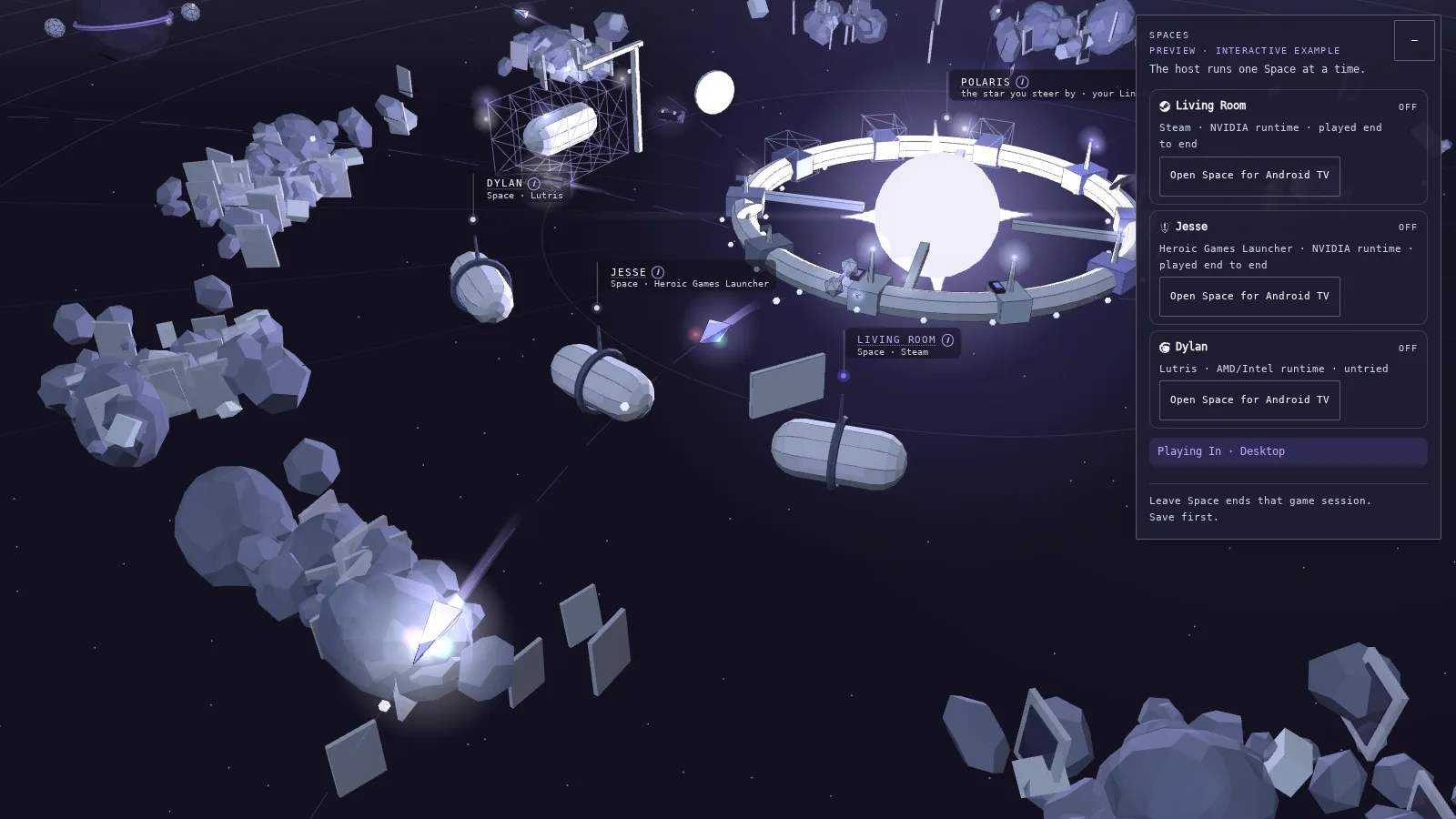
Spacespreview · interactive example
Open one Space and watch its habitat power on.
The host runs one Space at a time.
Living RoomOff
Steam · NVIDIA runtime · played end to end
JesseOff
Heroic Games Launcher · NVIDIA runtime · played end to end
DylanOff
Lutris · AMD/Intel runtime · untried
Playing In · Desktop
Leave Space ends that game session. Save first.
Device Access & Setup
Device Access
Device
Living Room
Jesse
Dylan
Android
Android TV
Steam Deck
Linux Desktop
Steam Frame
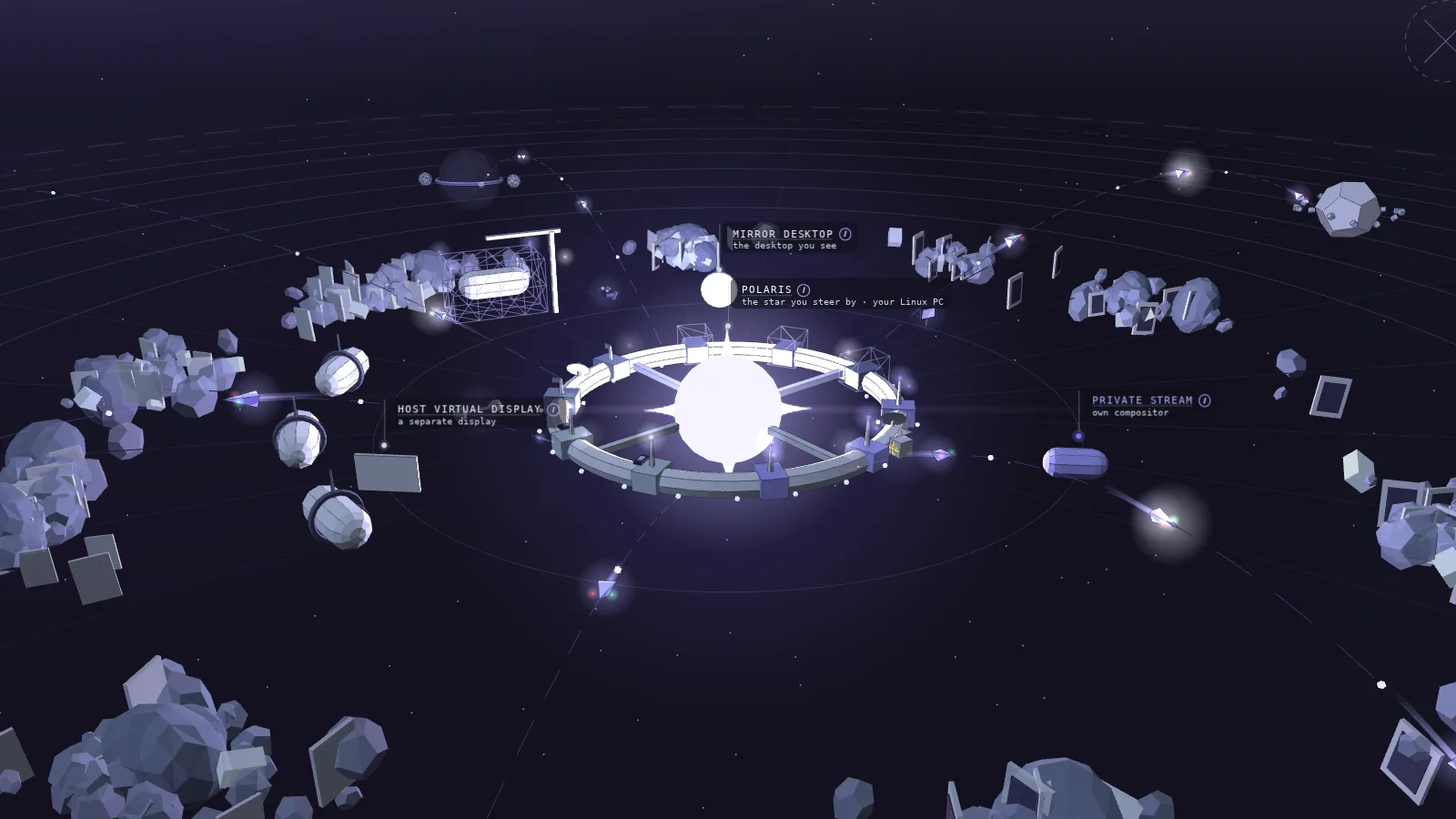
Map Key
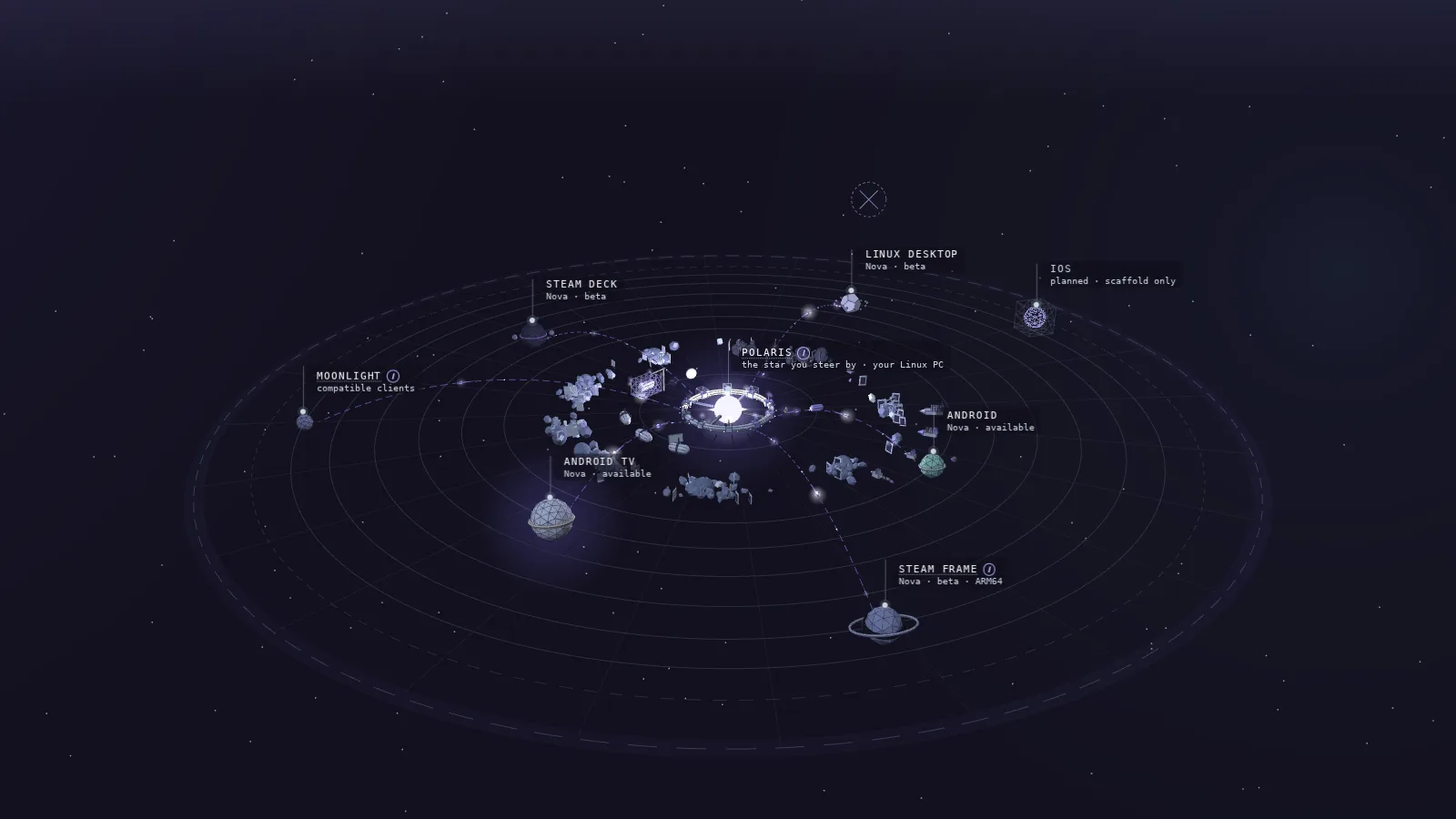
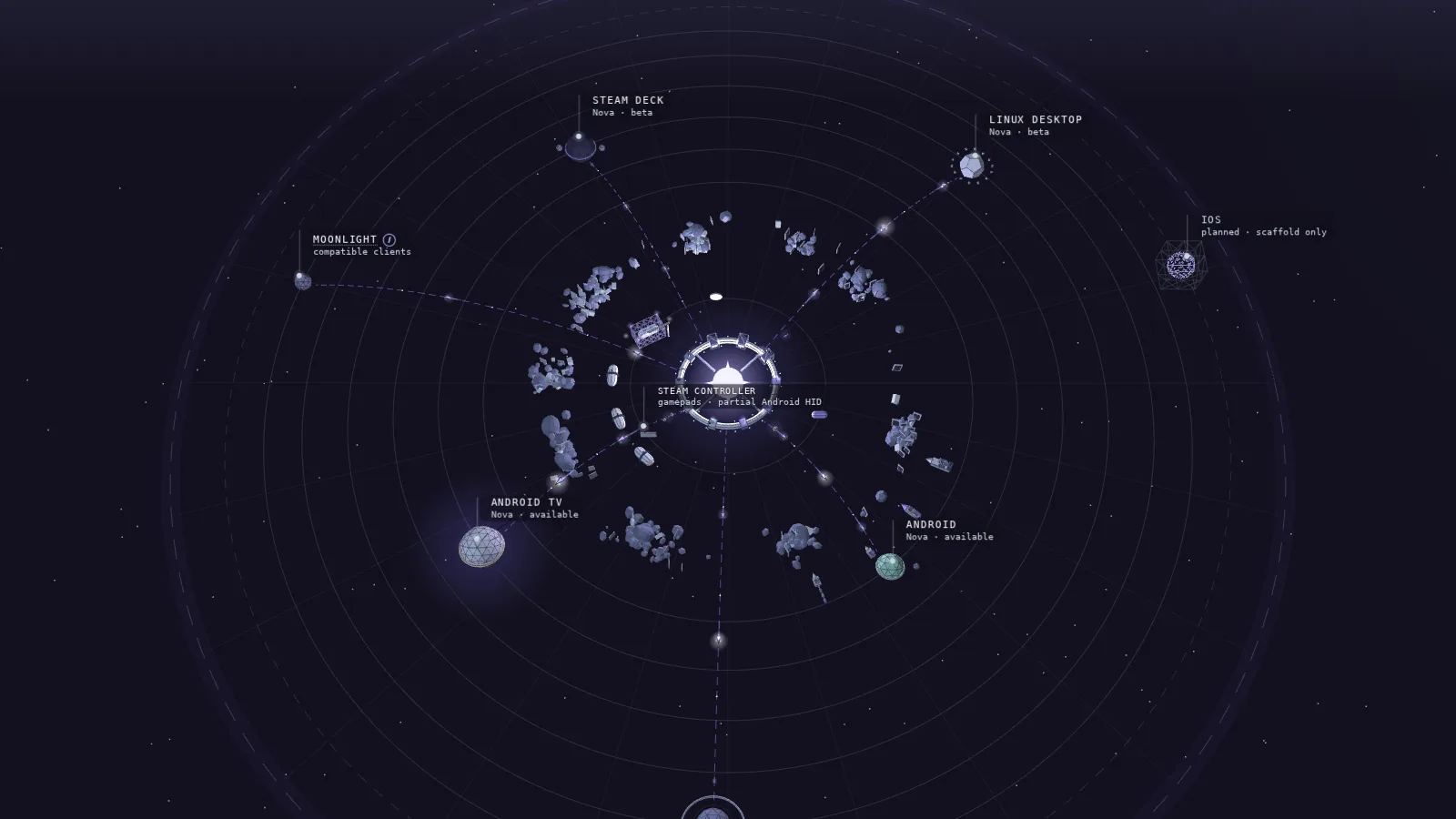
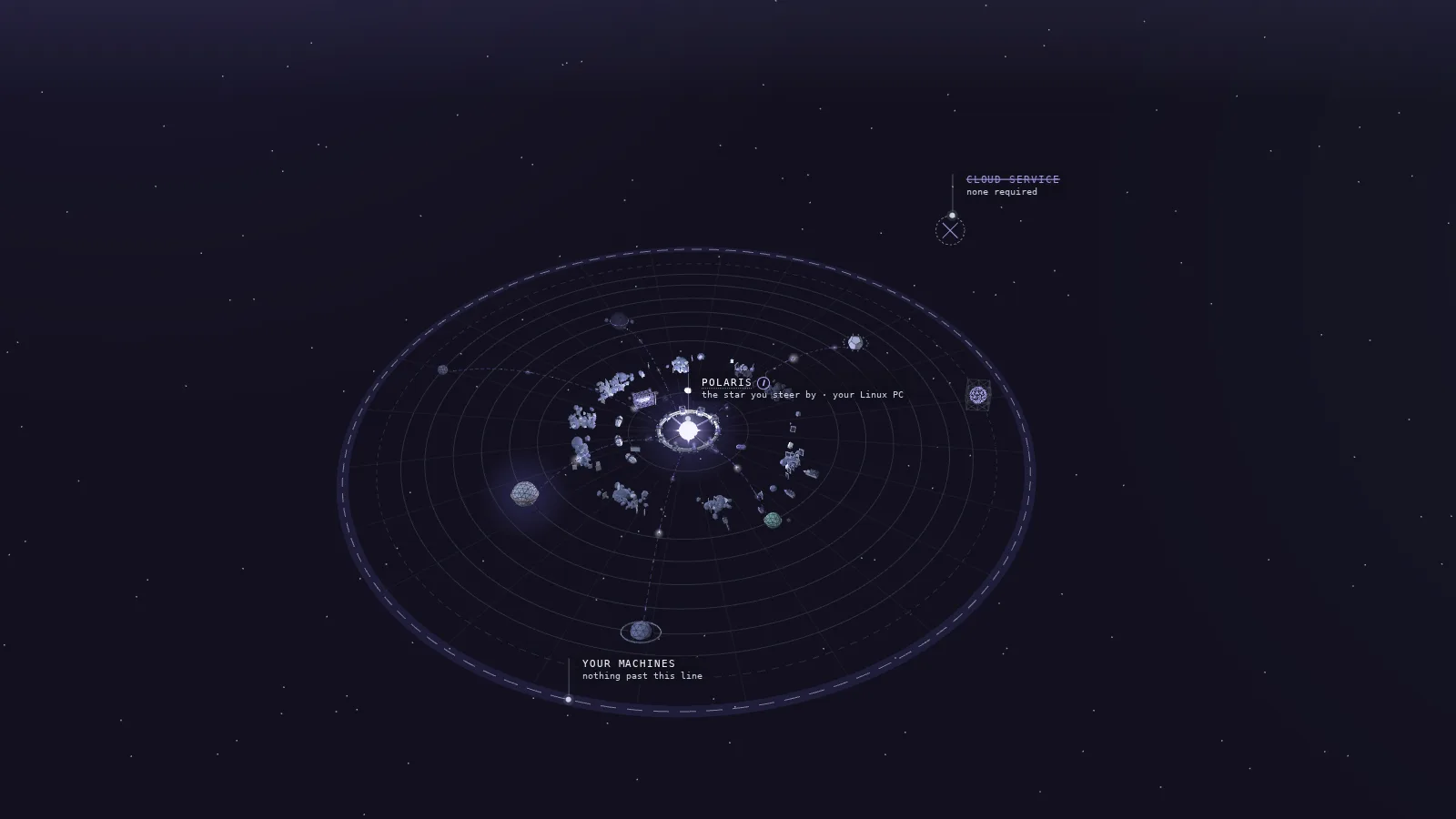
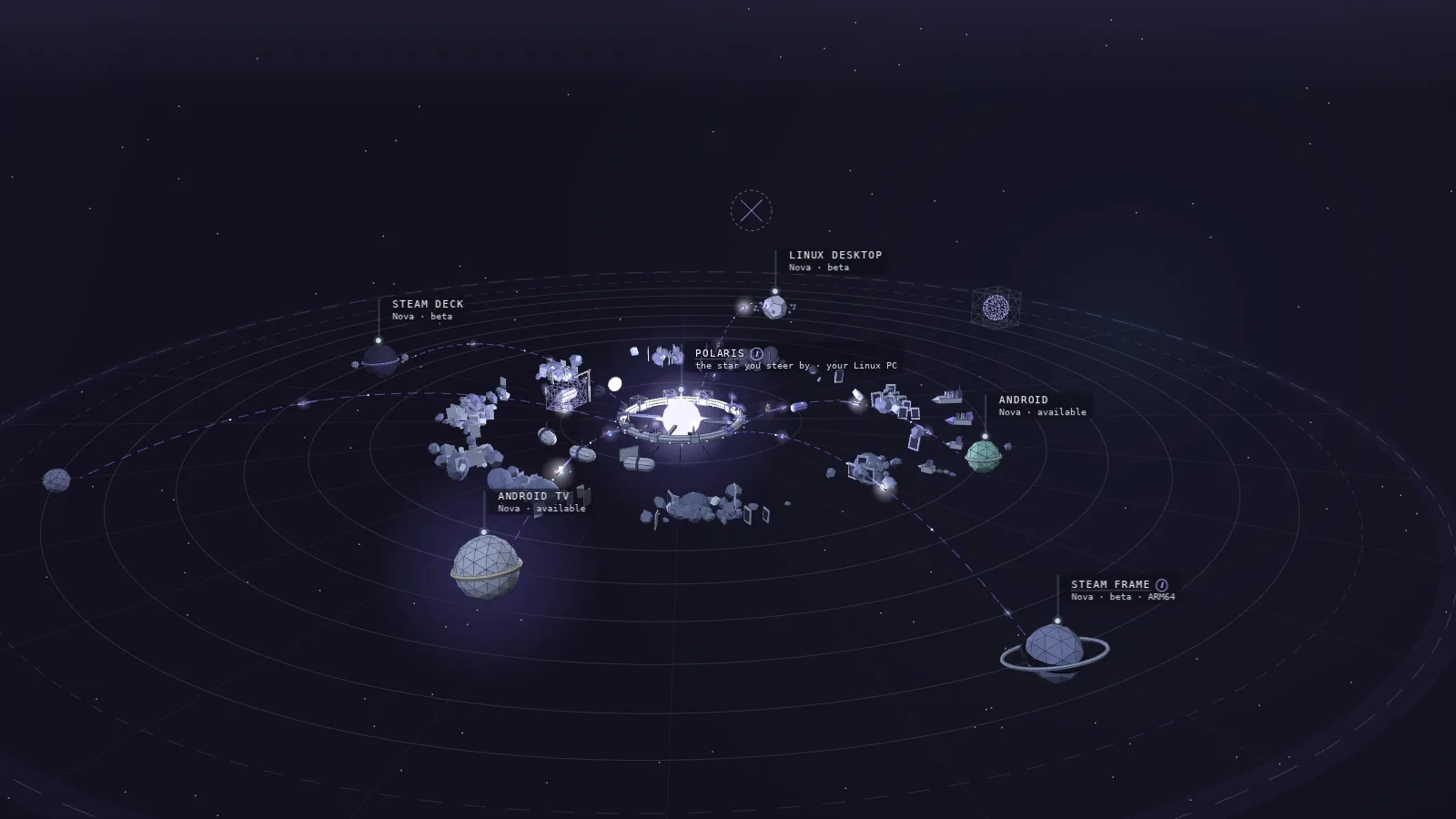
The star
Polaris, running on your Linux gaming PC.
The planets
the screens Nova plays on.
The ring of docks
the Linux distributions Polaris runs on.
The modules
the launch modes a game can run in.
The belt
your game library, with freighters bringing imports.
Ships on the lanes
frames of video on their way, and your input coming back.
The habitats
Spaces: separate sign-ins and libraries on one PC.
Space
A separate launcher sign-in, game library and set of saves on one Linux PC, run in its own gaming runtime. A host runs one Space at a time, and the owner decides which devices may open which. A preview.Spaces→
PyroWave
An experimental codec that runs as Vulkan compute instead of on the GPU's video engine. Every frame stands alone, so a lost packet costs one frame; it asks for far more bandwidth than HEVC and is chosen by name, never by Auto.PyroWave in the beta→
Frame
One picture of the game on its way to your screen. With HEVC a frame can lean on the keyframe before it; with PyroWave each one stands alone.How Live Tuning works→
Polaris
The host, and the star at the center of the map. It runs on your Linux PC, keeps your library, launches the game you pick and serves the stream.Meet Polaris→
Nova
The client, and what happens when the star's light reaches a screen. It browses your library like a console, files a plan before launch and keeps the stream's controls a shortcut away.Meet Nova→
Mission Control
The Polaris web console's first screen: the game that's playing or up next, the recent games shelf and one Diagnostics section.Tour Mission Control→
Host Console
The Polaris console opened from Nova on Android, in Nova's theme. Launch there streams the game to the device in your hands.Nova overview→
Private Stream
A session of its own: the game runs in its own compositor on your PC, and your monitors, windows and layout stay where you left them.Compare the launch modes→
Host Virtual Display
A separate display added to the host desktop, where your desktop can make one. Windows and icons may rearrange.Compare the launch modes→
Mirror Desktop
Streams the desktop you see, notifications included, when that is the point.Compare the launch modes→
Launch as
An app's own launch mode: Host default, or one fixed mode. A mode this host can't run is greyed out with the reason.Add and edit apps→
Find covers
Looks up every published game with no cover and proposes a match for each. Nothing is stored until you apply it from the review.Library and artwork→
Play Setup
Nova's plan before launch: what will happen, where the game runs, and the resolution, frame rate, codec and bitrate it will ask for.How Play Setup works→
Stream tiers
Recommended, Max and Custom choices in Play Setup, sized from the device's display and decoder rather than from a guess.How Play Setup works→
Command Center
Opens over the running game with Guide + Start: stream health, tuning, overlays, Steam on the host and the exit controls.Nova compatibility→
NovaHUD
The stream's health in a corner: frame rate, latency, bitrate and loss, with a stale or missing reading shown as one, never as a zero.Nova compatibility→
Live Tuning
The host adapting the live bitrate to loss and round-trip time while you play. On by default; a live change you make by hand turns it off for that stream only.How Live Tuning works→
Polaris Sync
Where Nova and the host compare notes: the host's default display mode and the launch profile it keeps for this device beside Nova's own, pushed either way on purpose. A normal launch never rewrites the host default.Polaris Sync→
Doctor
Reads the evidence a stream leaves and offers one verified step at a time, with Undo.Doctor: fix a bad stream→
Report This Moment
Freezes the current client readings into a local report you can share. Nothing is sent on its own.Nova overview→
Working Baseline
A stream you mark as known good, to compare a later stream against for the same PC and game. A side-by-side, not a verdict.Nova overview→
Trusted Pair
Pairing without a PIN on a network you trust, as the Polaris console allows it.Pair and manage devices→
Watch
Joins a live session as a viewer. The device that started it keeps control.Pair and manage devices→
Moonlight
Any Moonlight-compatible client pairs, browses, launches and streams from a Polaris host; Nova adds the host-backed parts.Play with Moonlight→
Steam Frame
A separate ARM64 Nova build in beta, attached to releases that include it. Checked at 1080p60 SDR; not Steam Frame Verified.Nova on Steam Frame→
Polaris runs your games on a Linux PC and sends their picture and sound to another screen.
Nova lets you play on Android handhelds, phones, tablets and TVs, or on Steam Deck, Linux and Steam Frame in beta.
Moonlight clients work too, with no cloud account or subscription.
Install Polaris on your PC and Nova on your playing device, then pair them.
Under the hood
Polaris hosts the game; Nova receives the stream and returns your input.
Host: Polaris runs on Linux, captures and encodes the game, and sends video and audio to the client.
Client: Nova runs on Android, Android TV, Steam Deck, Linux and Steam Frame. Moonlight clients can connect to Polaris too.
Connection: Nova uses the Moonlight/GameStream path for pairing, app launch, input and streaming. Install both apps, then pair the device with your PC.
The stream runs between host and client, with no Polaris or Nova cloud service or account in between. Library, tuning and session state come from the PC you paired.
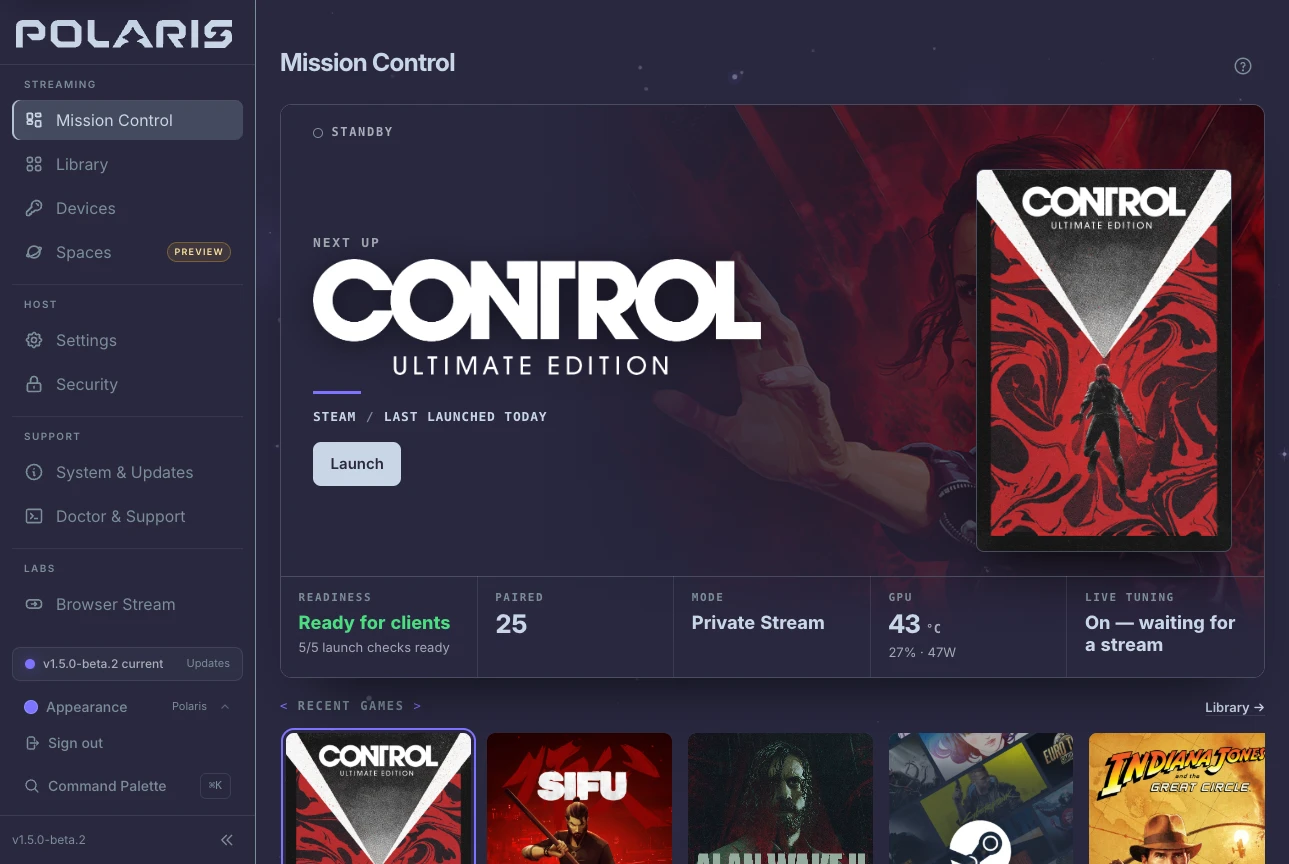
Mission Control: Open the browser dashboard to see whether your PC is ready and which game is playing or next.
Host Console: Open it from Nova on your Android phone to browse recent games and launch one on that device.
The scaffolding beside the star is the next release, still in drydock.
Under the hood
Mission Control brings the active game and host diagnostics into one console.
Game shelf: The running title, or the next title when idle, appears with its Steam artwork in 1.5.0-beta.2. The shelf holds up to eight recent games.
Diagnostics: Frame health, pacing, host vitals, launch checks and session history are grouped together. Missing host readings show a dash and a reason, never zero.
Android: Nova's Host Console opens the same console in Nova's theme. Launch streams to that device.
NVIDIA is the most tested host GPU; AMD and Intel use VAAPI.
Nova lets you browse your PC library and play on another screen.
Android: Choose the build for your phone, tablet, handheld or TV.
Beta: Steam Deck, Linux PC and Steam Frame have Nova builds in beta.
Other clients: Moonlight clients work with Polaris too. iOS is planned, with no Nova download yet.
Under the hood
Choose the client build and support level for your playing device.
Nova for Android: Available. Handhelds · phones · tablets · Android TV.
Nova on Steam Deck: Beta. Native SteamOS client · pairs, browses, and streams from Game Mode.
Nova for Linux desktops: Beta. Native x86_64 Linux client in beta · wider desktop interface in 1.5.0-beta.2 · stable downloads remain 1.4.13.
Nova for iOS: Planned. Scaffold and study only · no public client release.
Nova for Steam Frame: Beta. A separate ARM64 build, attached only to releases that include it · checked at 1080p60 SDR · not Steam Frame Verified.
Moonlight and compatible clients: Supported. Pair, browse, launch and stream from a Polaris host.
Standard Android gamepads are supported, with controller-first navigation throughout the client. Steam Controller support is partial Android HID: Android does not expose full Steam Input profiles or hidden analog controls through a standard gamepad source.
Picture and sound go to Nova; your button presses go back to the PC.
NovaHUD: See how well the stream is working.
Live Tuning: Send less video data when the network struggles, then raise it as the connection recovers.
Doctor: See what it measured and what it can safely change, with Undo. Try the congestion example to watch its verdict.
Under the hood
Live Tuning adjusts bitrate; Doctor explains measured network pressure.
Transport: Video and audio travel from host to client, with input returning to the host. No Polaris or Nova service sits in the middle.
Live Tuning: Enabled by default; adjusts live bitrate using loss and round-trip time.
Doctor: Evaluates video frame loss over the last 20 seconds. Network pressure starts at 2% and clears below 1%. Sustained loss can prompt one lower-bitrate step with Undo; applying it turns Live Tuning off for that stream only.
NovaHUD distinguishes stale or missing measurements from healthy readings, and media loss from control-channel retries.
PyroWave is experimental: losing one picture does not hold up the next.
Network: At 1080p60, plan for about 101 Mbps on a handheld or 246 Mbps on a TV. Use a wired network.
Selection: Choose PyroWave by name in Play Setup. Auto never selects it.
Build: Android needs the separate Nova Beta app. Linux includes it in the standard bundle in 1.5.0-beta.2.
Under the hood
PyroWave encodes each frame independently with an intra-only wavelet codec.
Vulkan compute: Frames have similar encoding cost. A lost packet affects one frame rather than its dependants up to the next keyframe.
Bitrate: Polaris uses the author's published model: 31 dB for handheld viewing, 35 dB for a room display. Automatic raises and Use recommended cap at 300 Mbps; a manual pin follows the host's advertised maximum up to 500 Mbps. Doctor offers guarded raises with Undo on a clean network.
Android Beta: Supports 4:2:0 and 4:4:4 where the decoder allows them, plus SGSR 1 upscaling, off by default.
Linux: The standard bundle includes the decoder in 1.5.0-beta.2. It supports SDR 8-bit 4:2:0 only.
Auto never selects it. Spaces cannot use it, Shield TV lacks the required Vulkan features, and Moonlight clients cannot decode it.
Choose how Polaris runs the game before you launch it.
Private Stream: a session of its own, your screens untouched.
Host Virtual Display: a separate display, where your desktop can make one.
Mirror Desktop: the desktop you see, when that is the point.
Start with Private Stream if you want to leave your desktop alone.
Under the hood
Each app can follow the host default or request a specific launch mode.
Private Stream: a session of its own, your screens untouched.
Host Virtual Display: a separate display, where your desktop can make one.
Mirror Desktop: the desktop you see, when that is the point.
Launch as: Choose Host default, Private Stream, Host Virtual Display or Mirror Desktop. Unavailable modes are greyed out with the host's reason in 1.5.0-beta.2. Unsupported launches are refused before streaming, with a reason and no substitute mode.
Before streaming, open Fix My Stream for the host's own configuration findings.
True HDR on Linux needs a KMS/DRM display path, an HDR-capable output reporting its metadata, a client requesting HDR and a 10-bit encoder. Headless Private Stream is SDR today; without usable metadata, a stream is treated as SDR rather than tagged HDR.
Bring your existing games into one Polaris library.
Import: Add Steam and Lutris games, or Epic Games, GOG and Amazon titles through Heroic.
Emulation: Add ROM folders for your emulated games.
Artwork: Use Find covers when artwork is missing. Review suggestions and approve what you want to add.
Under the hood
Imports and cover suggestions wait for your review before anything is added.
Imports: Steam, Heroic and Lutris titles are staged for review. Heroic includes Epic Games, GOG, Amazon and sideloaded titles, retaining each platform and recorded Wine or Proton runtime.
Find covers: Checks every published game without a cover and proposes a match for each. It stores nothing until you apply the review.
Recent games: The host fetches missing Steam backgrounds and logos once from Steam's own image servers in 1.5.0-beta.2. It does not use SteamGridDB for those images or fetch them for Desktop entries.
FreightersSteam · Heroic · Epic Games · Lutris · ROM folders
A Space keeps one player's sign-ins, library and saves separate on a shared PC.
Launchers: Create a Space for Steam, Heroic or Lutris, then select it in Nova.
Device access: Choose which devices may open each Space.
Preview: Spaces are optional and still a preview. The PC runs one Space at a time.
Under the hood
Each Space runs its launcher in a published gaming runtime image pulled by Docker.
Host: Needs Polaris, Docker, its GPU driver and input permissions. Steam, Heroic Games Launcher or Lutris runs inside the image; the host does not need those launchers installed.
Host Setup: Runs eight checks. It can grant Polaris access to Docker and install security support from the page, with approval at the PC's own screen.
Device Access: Controls which devices may open each Space. Permission changes wait until every Space stream has stopped.
The NVIDIA runtime has been played end to end; the AMD and Intel runtime has not. Only one Space runs at a time, Leave Space ends its game session, and Spaces cannot use PyroWave.
Play Setup shows where the game will run and the picture settings Nova will request.
Check: Review the launch and picture choices before you start. Pick a playing device to see its settings in this example.
This session: Your launch choices leave the host's defaults unchanged.
Polaris Sync: Compare Nova's settings with the host when you want them to match.
Under the hood
Review launch mode, display, resolution, frame rate, codec and bitrate before streaming.
Tiers: Recommended, Max and Custom use the device's display and decoder support. Custom retains its own bitrate when you switch tiers in 1.5.0-beta.2. Host restrictions on Launch as keep the host's reason visible.
Android route: Reports whether Nova's control connection reaches the host directly over Tailscale, through a relay or by an unknown route. It comes from the host's Tailscale daemon and does not verify where video and audio travel.
Polaris Sync: Under System in the Library or Every Game here, compares the host's default display mode and per-device launch profile with Nova's settings. You can push either way; a normal launch never rewrites the host default.
Profiles and fps: Android per-host rules can choose a saved Settings Profile and name the rule that matched. Nova offers 90, 120, 144, 165 and 240 fps only within 2 Hz of the screen's refresh rate; 30 and 60 are always available.
Command Center keeps stream controls within reach while the game stays on screen.
Guide + Start: Change stream settings, show overlays or leave the session.
Guide + Y: Show or cycle NovaHUD to see the stream's health.
Steam actions: Request Open Steam, Open Big Picture or Quit Steam on your PC.
Under the hood
Command Center stays open while you change stream settings.
Controls: Stream health, tuning, overlays, Quick Keys and session controls share the same panel.
Steam actions: Open Steam, Open Big Picture and Quit Steam act on the paired PC. Quit asks for confirmation while a game is running in 1.5.0-beta.2. The host refuses these actions for viewers, another client's session, private runtimes and Game Mode.
Local reports: Report This Moment freezes current client readings into a local report. Working baseline compares a later stream with one you know is good. Neither sends data on its own.
Polaris supplies the host's explanations; other Moonlight-compatible hosts retain the basic controls.
In Nova · controller shortcutsGuide + Start · Guide + Y
Pair a device with your PC, then choose how you join or leave its game.
Pair: Use Trusted Pair, the Polaris console's QR code or a PIN. Use Trusted Pair only on a network you trust.
Disconnect or Resume: Leave the game running and return later. End asks the PC to end that session's game.
Watch: Let another screen join without taking control.
Under the hood
The device that starts a session owns it; another device can join as a viewer.
Pairing: Trusted Pair, QR code and PIN are the three methods. Certificates, permissions and settings stay on your PC.
Lifecycle: Disconnect leaves the game running, Resume rejoins it, and End asks the host to end the game that session started.
Last Stream: After an Android stream ends, the host's Library can show duration, measured samples, per-metric averages and the end reason in 1.5.0-beta.2.
A reconnect does not prove that the picture returned. A connection ending does not prove that the game quit.
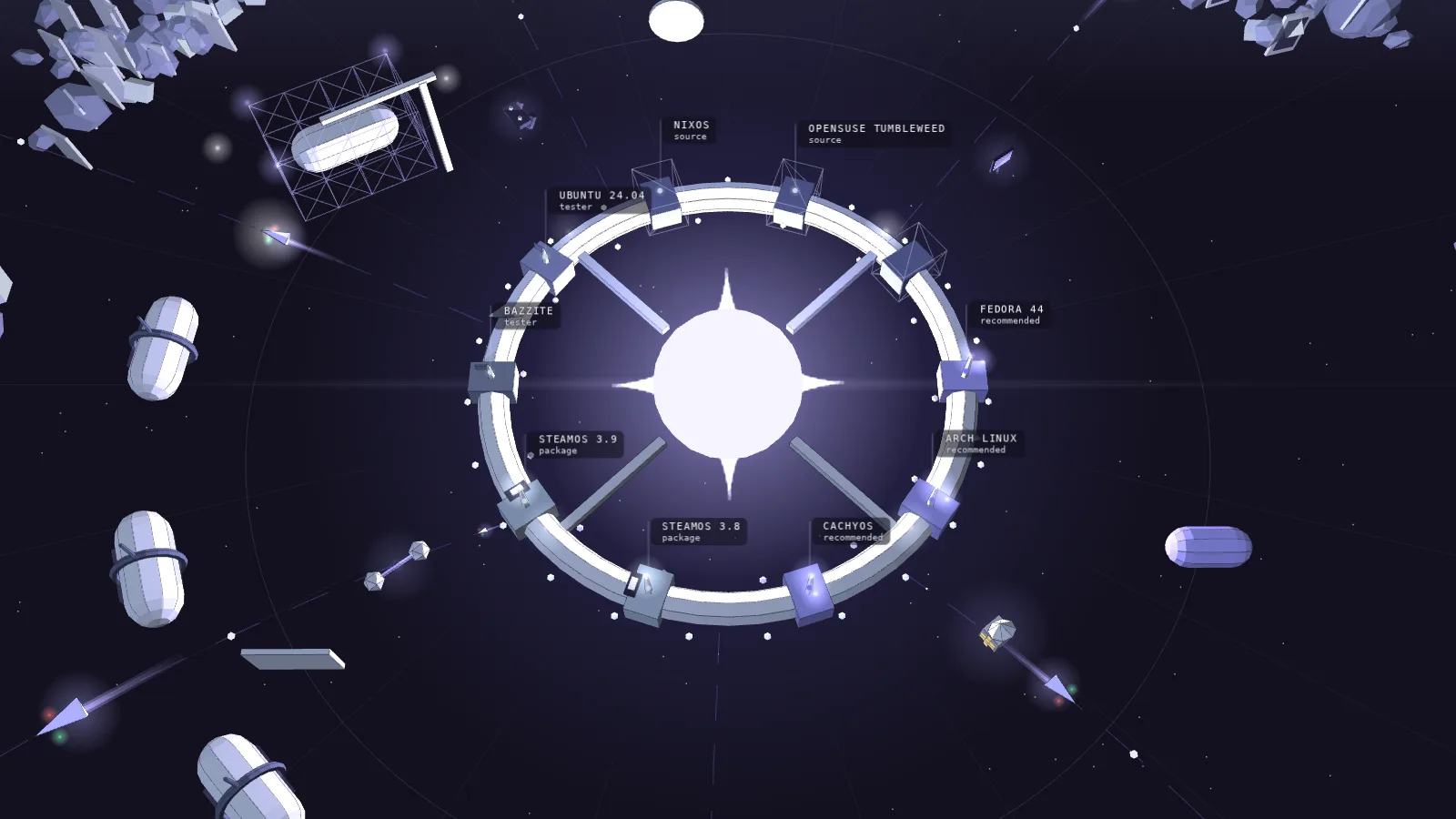
Match the Polaris install guide to the Linux version on your gaming PC.
Recommended: Fedora 44 · Arch Linux · CachyOS. Signed packages, with repositories that keep them current.
Package: SteamOS 3.8, and 3.9 in 1.5.0-beta.2 · Desktop Mode and Game Mode on Steam Deck. Versioned packages for SteamOS 3.8, and for 3.9 in 1.5.0-beta.2; an OS update can remove them.
Tester: Bazzite · Ubuntu 24.04. Published packages with experimental support.
Source: openSUSE Tumbleweed · other Linux distributions. Build it yourself, with community-validated guides.
SteamOS 3.8 and 3.9 need different packages: match yours to the version you run. A Steam Deck can be the host as well as a screen.
Under the hood
Host packages and support levels depend on the Linux distribution.
Recommended: Fedora 44 · Arch Linux · CachyOS. Signed packages, with repositories that keep them current.
Package: SteamOS 3.8, and 3.9 in 1.5.0-beta.2 · Desktop Mode and Game Mode on Steam Deck. Versioned packages for SteamOS 3.8, and for 3.9 in 1.5.0-beta.2; an OS update can remove them.
Tester: Bazzite · Ubuntu 24.04. Published packages with experimental support.
Source: openSUSE Tumbleweed · other Linux distributions. Build it yourself, with community-validated guides.
SteamOS 3.9 needs its own package in 1.5.0-beta.2; it cannot load the SteamOS 3.8 package's libraries. Both packages refuse installation on the other SteamOS release. Check the OS version first.
Steam Deck, ROG Ally and Legion Go can host as well as play. In Game Mode, gamescope owns the one screen, so every stream shows it, with keyboard, mouse, controller and touch input. Polaris keeps the configured mode and gives it back in Desktop Mode.
On SteamOS 3.9 an app can opt in to leaving Game Mode for Desktop Mode before a private launch in 1.5.0-beta.2. On 3.8 that launch is refused before anything changes.
Your PC and playing device connect without a Polaris or Nova cloud account.
On your PC: The host keeps your library and pairing settings. There is no subscription.
Outside home: Read the network guide before setting up remote access.
This site: No analytics or trackers. What is past the line is on the roadmap.
Under the hood
The host and client communicate directly, with optional services explicitly chosen.
Stream: Direct from your PC, with no account in between.
Pairing: Certificates, permissions, settings and your library stay on your PC.
AI tuning: Optional and off unless you choose a provider, including a local one.
Stream: Straight between your device and your host.
Source: GPLv3, built on Moonlight, developed in public.
Nova is distributed through GitHub Releases, Obtainium, and GitHub Store. GitHub Releases are the official source of the signed public APKs and their matching SHA-256 checksum files.
Set up Polaris on your Linux PC, put Nova on the device you play on, and pair them.
Choose: Pick your playing device or Linux distro below. You can also select it in the model to find its download.
Install: Follow the matching install guide, then pair your device with the PC.
Under the hood
Choose the matching package and follow its installation guide.
Release: Stable downloads use the current release. Beta and experimental options require an explicit choice.
Verification: Polaris packages and Nova builds are published on GitHub Releases with matching SHA-256 checksums. The downloads page identifies each file and links its guide.
Android ABI: Match the device's supported app ABI, which can differ from its CPU architecture.
Steam Deck: Uses the native Linux Flatpak bundle rather than an Android APK.
your game library, with freighters bringing imports.
Ships on the lanes
frames of video on their way, and your input coming back.
The habitats
Spaces: separate sign-ins and libraries on one PC.
Space
A separate launcher sign-in, game library and set of saves on one Linux PC, run in its own gaming runtime. A host runs one Space at a time, and the owner decides which devices may open which. A preview.Spaces→
PyroWave
An experimental codec that runs as Vulkan compute instead of on the GPU's video engine. Every frame stands alone, so a lost packet costs one frame; it asks for far more bandwidth than HEVC and is chosen by name, never by Auto.PyroWave in the beta→
Frame
One picture of the game on its way to your screen. With HEVC a frame can lean on the keyframe before it; with PyroWave each one stands alone.How Live Tuning works→
Polaris
The host, and the star at the center of the map. It runs on your Linux PC, keeps your library, launches the game you pick and serves the stream.Meet Polaris→
Nova
The client, and what happens when the star's light reaches a screen. It browses your library like a console, files a plan before launch and keeps the stream's controls a shortcut away.Meet Nova→
Mission Control
The Polaris web console's first screen: the game that's playing or up next, the recent games shelf and one Diagnostics section.Tour Mission Control→
Host Console
The Polaris console opened from Nova on Android, in Nova's theme. Launch there streams the game to the device in your hands.Nova overview→
Private Stream
A session of its own: the game runs in its own compositor on your PC, and your monitors, windows and layout stay where you left them.Compare the launch modes→
Host Virtual Display
A separate display added to the host desktop, where your desktop can make one. Windows and icons may rearrange.Compare the launch modes→
Mirror Desktop
Streams the desktop you see, notifications included, when that is the point.Compare the launch modes→
Launch as
An app's own launch mode: Host default, or one fixed mode. A mode this host can't run is greyed out with the reason.Add and edit apps→
Find covers
Looks up every published game with no cover and proposes a match for each. Nothing is stored until you apply it from the review.Library and artwork→
Play Setup
Nova's plan before launch: what will happen, where the game runs, and the resolution, frame rate, codec and bitrate it will ask for.How Play Setup works→
Stream tiers
Recommended, Max and Custom choices in Play Setup, sized from the device's display and decoder rather than from a guess.How Play Setup works→
Command Center
Opens over the running game with Guide + Start: stream health, tuning, overlays, Steam on the host and the exit controls.Nova compatibility→
NovaHUD
The stream's health in a corner: frame rate, latency, bitrate and loss, with a stale or missing reading shown as one, never as a zero.Nova compatibility→
Live Tuning
The host adapting the live bitrate to loss and round-trip time while you play. On by default; a live change you make by hand turns it off for that stream only.How Live Tuning works→
Polaris Sync
Where Nova and the host compare notes: the host's default display mode and the launch profile it keeps for this device beside Nova's own, pushed either way on purpose. A normal launch never rewrites the host default.Polaris Sync→
Doctor
Reads the evidence a stream leaves and offers one verified step at a time, with Undo.Doctor: fix a bad stream→
Report This Moment
Freezes the current client readings into a local report you can share. Nothing is sent on its own.Nova overview→
Working Baseline
A stream you mark as known good, to compare a later stream against for the same PC and game. A side-by-side, not a verdict.Nova overview→
Trusted Pair
Pairing without a PIN on a network you trust, as the Polaris console allows it.Pair and manage devices→
Watch
Joins a live session as a viewer. The device that started it keeps control.Pair and manage devices→
Moonlight
Any Moonlight-compatible client pairs, browses, launches and streams from a Polaris host; Nova adds the host-backed parts.Play with Moonlight→
Steam Frame
A separate ARM64 Nova build in beta, attached to releases that include it. Checked at 1080p60 SDR; not Steam Frame Verified.Nova on Steam Frame→